Displays for information, pricing & promotions

Digital Signage Solutions

Digital signage uses electronic displays to present information, advertising, prices, announcements or visual content. It can use an LED video wall, a scrolling display or another suitable screen. Content can change without replacing the physical sign.

Halo Technologies supplies, installs, configures and supports LED signage solutions from Kattappana, Idukki, Kerala. We help select the display and control system around your application, viewing distance, environment and content requirements.

Choose a format for your message

Digital signage describes the use of the display. The display technology determines which content it can show and how it fits your space.

LED video walls

A modular LED video wall combines panels into a larger display. It is a form of digital signage when used for promotions, video or information, including commercial and event applications.

Dimensions depend on the panel arrangement. Pixel pitch is the spacing between display pixels: closer viewers generally need finer pitch for readable detail. Brightness must suit ambient light, with equipment selected for indoor or outdoor use.

LED video-wall selection and installation

LED scrolling displays

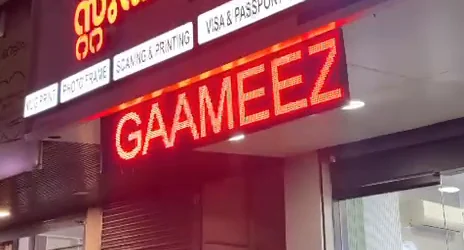
A scrolling LED board presents short text such as notices, offers, opening information and announcements for businesses or institutions. A single-colour board shows messages in its supported LED colour; it is not a full-colour video screen.

Halo's documented P10 installation used a red horizontal board and a yellow vertical board. The configuration and text size should suit the available space and where people read it.

See the real P10 scrolling-board project

Digital price displays

Price boards show changing numeric or text information for applications such as retail counters, supermarkets and petrol pumps. Their layout should keep the relevant price or message clear.

Suitable systems can support remote or multi-branch price updates. The controller, network connection and update requirements must be agreed for the selected system.

Explore price displays and control options

How the display gets its content

A digital-signage system combines a message, a compatible player or controller, and a display. The player may be separate, built into the screen or part of the LED control system.

  1. Prepare the contentChoose readable text, images or video that fit the display's dimensions and capabilities.
  2. Load the player or controllerUse the selected system's software or application to transfer the content and set playback where supported.
  3. Show it on the displayThe controller sends the information to the screen or LED modules.
  4. Update when neededUse the configured local or network update method to change messages, prices or promotions.

Update methods depend on the system. In Halo's P10 project, a compatible mobile application connected to the HUIDU controller's local Wi-Fi for message updates. Local Wi-Fi updating does not itself mean internet or cloud control.

Remote updates and scheduling need compatible hardware, software and, where applicable, a suitable network connection. For multiple sites, discuss who changes the content, access permissions and whether each site needs different messages.

Digital signage and printed signage

Choose around how often the message changes and where it will be seen. A long-term static sign and a frequently updated display have different practical needs.

Swipe or scroll across the table to see both options.

Practical differences when planning a sign
FactorDigital signagePrinted signage
Content changesElectronic updates using the selected control system.Requires changing or replacing the printed material.
Motion and videoAvailable on suitable displays; text boards have different capabilities.The printed message stays static.
SchedulingPossible with compatible software and hardware.Changes normally require physical intervention.
Initial investmentOften higher because it includes electronics and installation.Often lower for a simple sign; size and construction still matter.
Frequent updatesChanges can reuse the existing display.Repeated changes can involve reprinting and fitting costs.
Ongoing needsPower, content management and equipment maintenance.Cleaning, condition checks and eventual replacement; illuminated signs also need power.

Plan for indoor or outdoor conditions

Location affects readability, equipment selection and the installation. Brightness alone does not establish that a display is suitable outdoors.

Indoor and window-facing displays

Check the nearest viewing position, ambient light and reflections. A screen behind glass can still face strong daylight and heat. Match pixel pitch, text size and brightness to the audience and the message.

Allow for ventilation, power and data connections, mounting and access for maintenance.

Outdoor displays

Consider sun exposure, rain, moisture, wind and viewing distance. Select equipment and an enclosure suited to the actual weather exposure, with protected connections and an appropriate mounting structure.

Plan power requirements, brightness settings, drainage or ventilation as applicable, and access for servicing. Environmental specifications must be checked for the selected equipment and installation.

Choosing the right signage system

Bring these details to the first discussion. A useful system fits the message, viewing conditions and how your team will operate it.

  • Location and light: indoors, behind a window or outdoors; approximate daylight exposure and installation position.
  • Audience and size: approximate viewing distance, available width and height, and the information people need to read.
  • Content: short text, prices, images or video; how frequently it changes and who updates it.
  • Control: local updates or remote access; one display or multiple sites, and available connectivity.
  • Installation and budget: power availability, mounting, maintenance access and which application needs matter most.

Short notices may suit a scrolling board; changing prices may suit a price display; richer visual content may suit an LED video wall. LCD screens are another display technology to compare for close-range detail. Our LED versus LCD retail guide explains the selection considerations.

For technical background, see LG's explanation of modular LED displays and Samsung's guide to pixel pitch, resolution and viewing distance.

What affects digital-signage cost?

A quotation depends on the selected system and site requirements. A screen dimension alone is not enough to price the completed installation.

  • Display technology, dimensions, pixel pitch or resolution, brightness and indoor/outdoor specification.
  • Controller or player, update method and content-management requirements.
  • Mounting structure, power provision, cabling and any required network connection.
  • Site access, installation work, testing and configuration.
  • Ongoing power use, content work, maintenance and any applicable software or connectivity charges.

Share the application, location, dimensions and control needs so we can discuss the scope. Confirm what the quote includes and the support arrangements for the chosen system.

Installation, handover and local support

Halo's display service covers supply, installation, configuration and local support. The actual work depends on the display and the site.

  1. Understand the requirement: discuss the application, content, dimensions, viewing distance and location.
  2. Assess the site and select the system: consider mounting, power, cable routes, weather exposure and the control method.
  3. Prepare and install: configure the chosen display/controller and carry out the required assembly and mounting.
  4. Test and hand over: check the display in operation, set up suitable content and show the customer how to update it.

For ongoing use, keep content readable, check that updates and playback work, and allow access for equipment service. Outdoor installations also need attention to the condition of their enclosure, mounting and connections. Discuss the maintenance needs and support terms for your installation with the team.

A real Halo display installation

P10 scrolling boards in Kattappana

Halo Technologies assembled and installed two outdoor single-colour scrolling boards near New Bus Stand: a horizontal red display and a vertical yellow display. The case study documents rear-side sealing, workshop testing, installation and local Wi-Fi message updates with original photographs and footage.

This is an example of a text-display installation. The configuration for a full-colour video wall or another application will differ.

Red horizontal P10 LED scrolling board operating at the real Halo installation near New Bus Stand, Kattappana
The installed red P10 scrolling board. See the complete project for the assembly and installation footage.

Plan your display with our Kattappana team

Halo Technologies serves Idukki and surrounding areas, subject to project requirements. Share your location, intended content, approximate display size and whether you need local or remote updates.